Key takeaways
- The soundbar must connect to the HDMI port on the TV explicitly labelled ARC or eARC, never to a plain HDMI input port meant for a source.
- ARC carries roughly 1 Mbps of compressed audio, enough for streaming Dolby Atmos in Dolby Digital Plus, while eARC's roughly 37 Mbps is what lossless TrueHD and DTS-HD Master Audio from a 4K Blu-ray actually need.
- Setting the TV's audio output to Bitstream or Passthrough, not PCM, fixes more missing Atmos than a new cable or a different soundbar ever does.
- Most HDMI cables from the last several years carry eARC audio without issue, and only runs longer than about 5 to 10 metres usually need an Ultra High Speed replacement.
- The soundbar's own display or app, not the TV's settings menu, is the only reliable way to confirm Atmos is actually being decoded.
You have just carried a new soundbar in from the car, and the box shows a cable marked eARC near the connector. Somewhere on the back of the TV are two or three HDMI ports that look identical, and only one of them is going to give you what you paid for.
Get this wrong and the bar will still make sound. Dialogue will be audible and the volume knob will work, and you might never notice anything is missing until a friend with the same soundbar has Atmos moving over their head and yours does not.
I have fitted enough of these to know the gap always comes down to the same four decisions, usually made in the first twenty minutes after unboxing, and one final check that most people skip entirely.
None of the four is difficult on its own. What trips people up is that a wrong choice at any single step still produces sound, just not the sound the box promised, so there is rarely an obvious error to chase down afterward.
The port on the back of the TV, not the one on the bar
Every recent TV has one HDMI port doing double duty as an audio return channel, usually printed right on the case as ARC or eARC next to the port number. That port is where the soundbar’s HDMI OUT (TV ARC) connector goes, not any of the other HDMI IN ports meant for a games console or a disc player.
Plug the bar into a plain input port instead and the picture will still look fine if you are also running video through it, but no audio will return from the TV’s own apps at all. On a Samsung HW-Q990D or a Sonos Arc Ultra, that one cable and one port combination is the entire connection: no optical cable, no extra box.
Check the TV’s own manual or settings menu for the word eARC specifically. Some TVs sold between about 2015 and 2018 have a port labelled ARC that never actually supports the eARC standard, whatever the soundbar’s own box might have promised.
Older sets with no ARC or eARC port at all are not stuck without any option. Most still have an optical output round the back, which handles Dolby Digital 5.1 and DTS 5.1 fine, just never Atmos or DTS:X. The full trade-off between the two connection types is worth reading in optical versus HDMI for TV audio before deciding a TV needs replacing.
eARC versus ARC: the bandwidth difference underneath the label
The two letters hide a real difference in capacity. ARC carries roughly 1 Mbps of compressed audio, enough for Dolby Digital Plus, which is exactly how Netflix, Disney Plus, and most streaming services deliver their Atmos mixes.
eARC carries roughly 37 Mbps, and that extra headroom is what lossless Dolby TrueHD and DTS-HD Master Audio actually need, the formats behind Dolby Atmos and DTS:X on 4K Blu-ray discs. Streaming Atmos works over plain ARC. Disc based lossless Atmos does not.
| Connection | Approx bandwidth | Formats it carries |
|---|---|---|
| ARC | About 1 Mbps | Dolby Digital, DTS, Dolby Digital Plus (streaming Atmos) |
| eARC | About 37 Mbps | All of the above, plus Dolby TrueHD and DTS-HD Master Audio |
The HDMI Forum’s own specification is the source for those figures, worth a look if you want the exact numbers rather than a technician’s rounding. For the fuller comparison of what each one changes day to day, see eARC versus ARC in practice.
Bitstream or PCM: the menu setting that quietly strips Atmos
This single setting causes more disappointment than a bad cable or the wrong port combined. Most TVs offer a choice between Bitstream, sometimes called Passthrough, and PCM for the digital audio output.
PCM means the TV has already decoded the track itself before sending it onward, which strips out the object based metadata Atmos depends on. Bitstream or Passthrough sends the encoded stream untouched, metadata intact, straight to the soundbar to decode.
If a TV update or a factory reset ever quietly switches this setting back to PCM, Atmos disappears with no error message on screen. It is usually the first thing worth checking before assuming a cable or the bar itself has failed.
The exact menu wording varies by brand, buried under sound or audio output settings, but the choice itself is universal across TVs. Samsung calls it Digital Output Audio Format, LG calls it Digital Sound Output, and Sony buries it under HDMI signal format, yet all three offer the same underlying Bitstream or PCM choice.
For the full walkthrough by brand, see bitstream versus PCM, which to choose.
Whether your existing HDMI cable is actually the problem
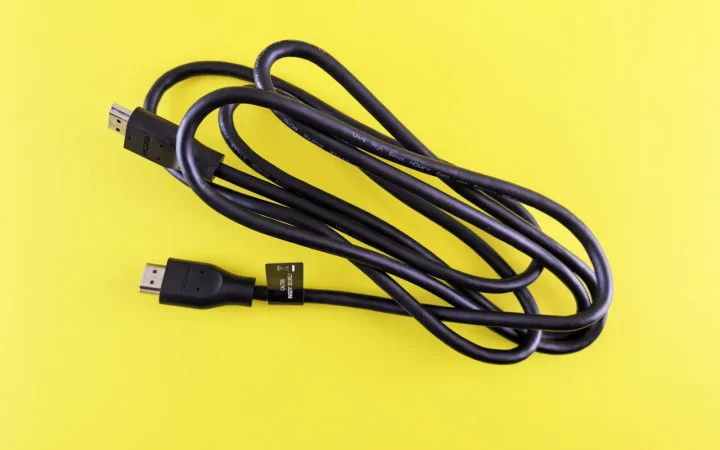
eARC’s own audio bandwidth, around 37 Mbps, is trivial next to what a modern HDMI cable can carry, so nearly any certified cable bought in the last several years handles it without trouble. An Ultra High Speed cable, rated to 48 Gbps, is not usually required just for eARC audio to work.
Length is where it actually bites. I fitted a system with a 10 metre run behind a false wall that kept losing its eARC handshake every few hours, and swapping in an active Ultra High Speed cable rated for that distance fixed it completely. A 2 metre cable from a drawer almost never causes the same problem.
Ultra High Speed cables in a 2 metre length run around 10 to 25 USD, rising to about 40 to 60 USD for a certified 8 to 10 metre run with active electronics built in. That is worth spending once, rather than replacing a shorter cable repeatedly on a guess.
For the specific cases where a replacement cable genuinely earns its cost, see whether you need a special cable for eARC.
Confirming the soundbar is decoding Atmos, not faking it
The TV’s settings menu will happily claim Atmos is active even when it is not reaching the bar correctly. The soundbar’s own display or companion app is the only reliable confirmation, since it shows the format it is actually receiving in real time.
Play a known Atmos title, one of the demo scenes on Netflix or a Dolby demo reel, and check the bar’s front display or app. A Sony Bravia Theater Bar 9 or an LG S95TR will show Dolby Atmos explicitly. If it shows Dolby Digital, DTS, or PCM Stereo instead, something upstream is still wrong.
One install in a converted garage cinema stuck on Dolby Digital for weeks despite a correct eARC port and a new cable, purely because a software update on the TV had quietly reset the audio output back to PCM. A five second menu change fixed what looked, on paper, like a hardware fault.
- TV audio output set to Bitstream or Passthrough, not PCM
- Soundbar connected to the port labelled ARC or eARC, not a plain HDMI input
- Cable confirmed good on runs longer than about 5 metres
- Soundbar’s own display checked during actual Atmos content, not assumed from a menu
Where the deeper guides pick up from here
Those four decisions, port, bandwidth, bitstream setting, and cable, cover most of what determines whether Atmos reaches a soundbar intact. Two more things sit just outside that list and are worth knowing before you call an installer.
One remote controlling the TV, the bar, and a games console together depends on HDMI-CEC being set up correctly, a separate system from anything above. And when the handshake itself keeps failing on a correctly wired setup, the fix is usually one of the specific steps in clearing an HDMI handshake problem.
Get the four basics right first. Everything else on top of them is a smaller fix, not a rebuild.
Questions readers ask about this
Not really. Streaming Atmos arrives as Dolby Digital Plus, which fits comfortably inside plain ARC's roughly 1 Mbps of bandwidth. eARC only becomes necessary for lossless Dolby TrueHD or DTS-HD Master Audio from a 4K Blu-ray player, so a TV with ARC alone is not a problem for streaming.
Not automatically. Some TVs sold roughly between 2015 and 2018 have a port labelled ARC that supports only original ARC bandwidth even though eARC already existed. Check the TV's specification sheet or settings menu for the word eARC explicitly rather than assuming it from the port label alone.
Almost always the TV's audio output is set to PCM instead of Bitstream or Passthrough. PCM means the TV decodes the track itself first, stripping the object based metadata Atmos needs before the signal ever reaches the bar. Switching that one setting resolves it in most homes.
Yes, particularly on runs longer than about 5 to 10 metres. Video can still pass acceptably while the eARC audio channel drops out or the handshake resets every few hours, since the two use different parts of the connection's bandwidth and tolerances.
No. eARC uses a separate data channel from the video bandwidth that carries 4K or 8K picture, so turning it on or off has no effect on frame rate or resolution. The two features can be configured entirely independently on a modern TV.

About the author
Rahul Gupta
Rahul Gupta has spent nearly a decade quietly wiring living rooms, testing soundbars in every awkward apartment layout imaginable, and untangling the kind of HDMI handshake problems that make people give up on Atmos altogether. He writes here about what actually works when you get the boxes home—not what the spec sheet promises. If a piece of gear on this site earns a recommendation, it earned it in a real room with real furniture, not a lab.